
Guide · Everyday help
A personal assistant that gets things done and remembers why
Your week is spread across a calendar, an inbox and a notes app, and none of them knows why Thursday matters.
Wedelia is a personal assistant you talk to, one that remembers you. In that same conversation, Wedelia can plan around your calendar, prepare an email reply for you to check, keep track of what you spend and look things up with sources. The recordings below are from the real app.
It starts with a conversation
You choose your assistant when you set up the app. Each has a personality and daily scenes, and you can talk by text or voice. Nothing below is a separate mode. You ask in the chat the way you’d ask a friend, and your assistant draws on what you’ve shared before along the way.
Plan your day around your calendar
Give Wedelia calendar access and ask your assistant to plan around what’s already booked. Wedelia reads your appointments, leaves those times alone, fills the gaps, and saves the plan as an itinerary you can open and share.
Check travel times and opening hours before you set off. See the full calendar walkthrough.
Draft an email reply, then you decide
If you connect Gmail, which is optional, your assistant can read an email you point to and save a reply in your Gmail Drafts. You can edit it there or in the app. To send from Wedelia, you review the recipients, subject and body on a confirmation card and tap Send, one message at a time. Nothing is sent on its own.
Keep track of what you spend
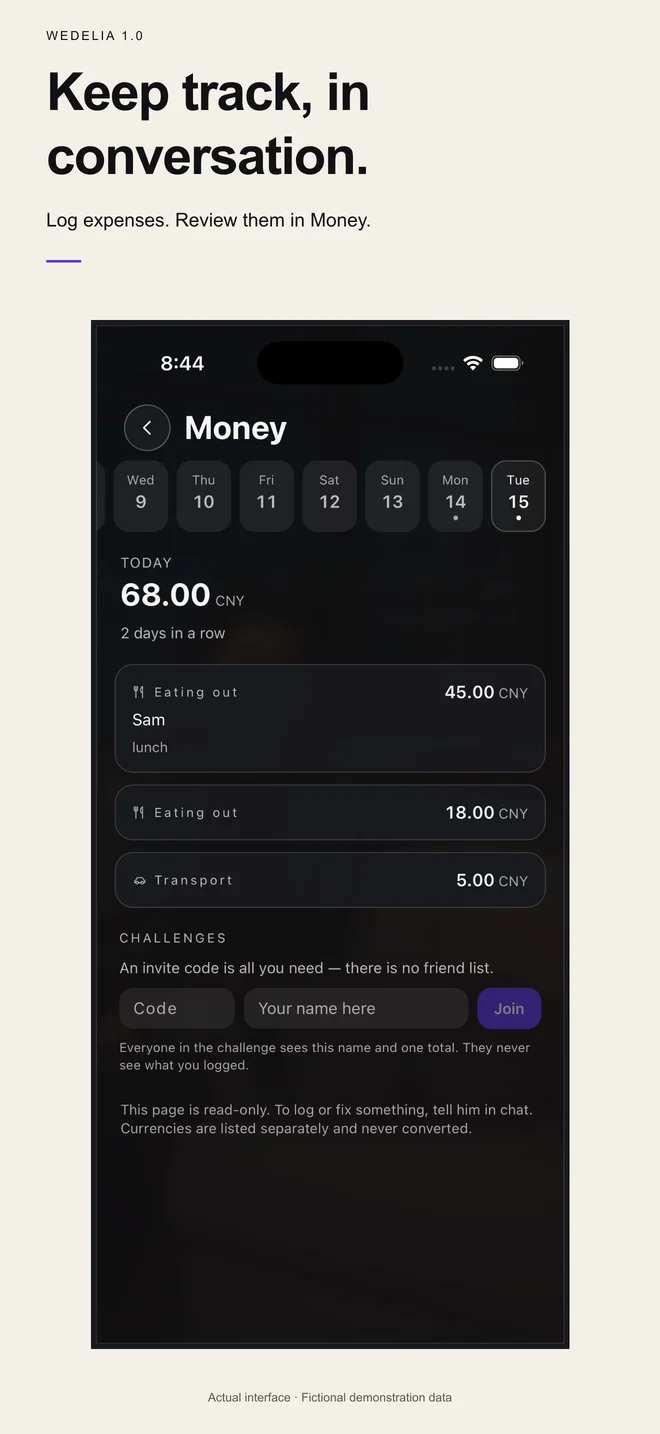
Say “train, 8.40” or “lunch with Sam, 45” and it’s logged under a category. The Money page shows each day’s spending. Different currencies stay separate. This is not a bank connection, and it is not financial advice.
Answers you can check
For questions that need the web, your assistant searches, answers in the chat and attaches a sources card. Open the card to read the original page yourself.
A few more things that get done
- Books
- Import a DRM-free EPUB, select a passage and talk it over.
- Meals
- Log a meal and see rough calorie and nutrient estimates. Estimates can be wrong and are not medical advice.
- Mornings
- A morning brief can open with what’s on your day.
- Wedelia Radio
- Original music, with your assistant’s daily scene in the background.
- Canvas
- Turn a conversation into a small page, tool or itinerary.
What won’t happen without you
Calendar, reminders, location and Google services are optional, and your assistant asks before using them. You can turn each one off later. Email goes out only when you tap Send. There is no connection to your bank. For medical, legal or money decisions, treat what your assistant says as a starting point and check it with someone qualified.
What it costs
Everyday features, including the ones on this page, are free within the weekly allowance shown in the app. Wedelia Plus raises those limits for US$12.99 a month or US$89.99 a year. These are US prices; your app store shows the local price, trial eligibility and renewal terms before you confirm.
Questions about everyday help
Can Wedelia send emails for me?
A reply is saved to Gmail Drafts. A message is sent only after you review its recipients, subject and body on the app’s confirmation card and tap Send, one message at a time. Nothing is sent automatically or without confirmation.
Does Wedelia need access to my calendar?
Only if you want plans built around your appointments. Calendar access is optional, and ordinary chat works without it.
Does Wedelia connect to my bank?
No. You log spending by mentioning it in conversation, and you review it on the Money page.
Where do the answers with sources come from?
Your assistant searches the web and shows the pages used on a sources card. Open them to check the answer, especially when it matters.
Are these features free?
Yes, within the weekly allowance shown in the app. Wedelia Plus raises the limits: US$12.99 monthly or US$89.99 annually (US prices).
Ask your assistant about tomorrow.
Start with one thing on your plate this week.
iPhone and Android · Adults 18+ · Available in supported regions. Features can vary by device, language and release.
Wedelia is AI. It is not a person, therapist, doctor, financial advisor or emergency service.
Recordings are from the English app. Waiting time is shortened where noted.